How to Create a QR Code for an Interactive PDF in 2026
Learn how a QR code for an interactive PDF may connect brochures, booth graphics and product tags to a ZenFlip flipbook that businesses can track and measure.
Written by: Jagadish C U (Founder Of Zentrovia Solutions)
A QR code for an interactive PDF can connect a printed brochure, a booth banner or a product tag to a live ZenFlip flipbook. For business teams, that connection may be the difference between a printed piece that ends the moment it is handed over and one that lets buyers continue exploring on their own phones. This guide explains how ZenFlip describes the process, what teams might do with it, and what to consider before sending anything to print.
Why a QR Code for an Interactive PDF Suits B2B Teams
Printed collateral is limited by its page count and its format. A brochure cannot show a video, a menu cannot report which dishes were viewed, and a catalogue cannot tell you which buyer read which page. A QR code for an interactive PDF may give teams a way to extend the printed surface into a richer, measurable experience.
One scan, no app
ZenFlip's retail and wholesale page describes visitors scanning a code and instantly browsing a full product range on their phones, with no app required. For a buyer passing a trade show booth, fewer steps between interest and content could mean fewer lost opportunities.
A destination that can report back
A plain link to a downloaded file usually tells you little. A code that leads to a ZenFlip publication, on the other hand, may lead to analytics that show how the content is used. That shift, from handing out files to opening a measurable destination, is the main business reason teams look at a QR code for an interactive PDF in the first place.
How to Create a QR Code for an Interactive PDF With ZenFlip
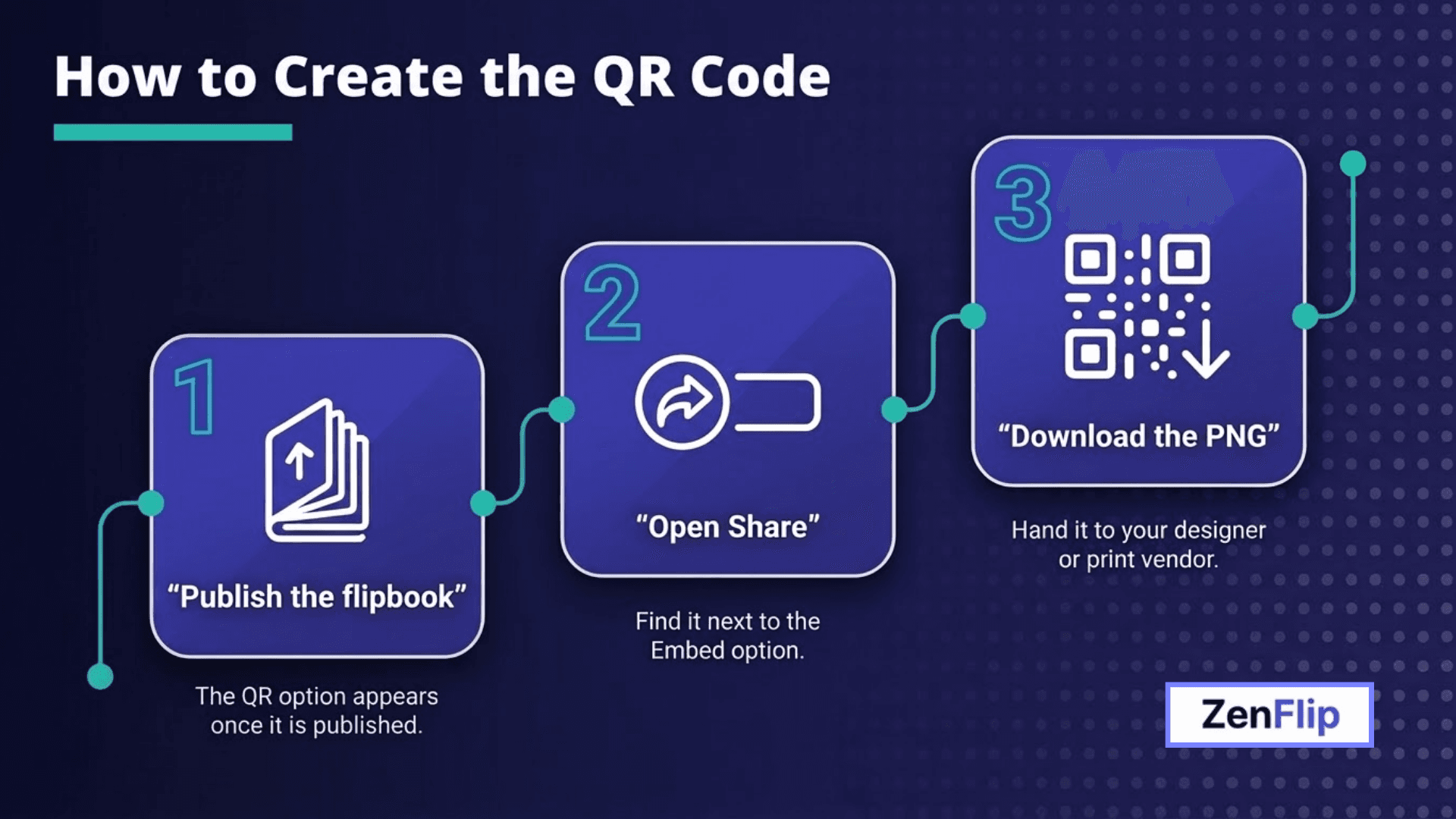
The process starts with the PDF you already have and takes only a few actions inside the dashboard.
Publish the flipbook first
Upload the PDF to ZenFlip and publish the resulting flipbook. The QR code option is available once the publication is published, so a draft will not offer it yet.
Read: ZenFlip | Creating your first flipbook
Open Share and download the PNG
Next to the Embed option, ZenFlip provides a Share button. Selecting it reveals the QR code, which can be downloaded as a PNG and saved for your designer or print vendor. ZenFlip's developer documentation also lists QR code generation among the Publications API capabilities, which may suit teams that publish many documents programmatically.
Place the code where buyers will see it
ZenFlip's examples include booth graphics, business cards and product tags. Teams might also consider menus, rate sheets, event packages and sales folders, because each of these is a printed piece that could benefit from a digital companion.
Read: ZenFlip | Use Case | Digital Brochures
What Readers See After They Scan
The scan is only useful if the destination feels good on a phone, and ZenFlip's pages describe several details that might matter to a buyer standing at a booth.
A viewer built for phones
ZenFlip's hospitality page describes a mobile-optimised viewer for guests browsing on their phones, with flipbooks that are fully responsive on iOS, Android and other mobile browsers, using touch gestures and an adaptive layout.
Accessibility features included for every reader
The same page lists keyboard navigation, screen reader support, text-to-speech with word highlighting, an immersive reader with dyslexia support and reduced motion support as part of ZenFlip's WCAG 2.2 AA design, and shows them across all tiers.
Read: ZenFlip | Features | Accessibility
Use Separate QR Codes for Separate Audiences
Not every reader should see the same document, and ZenFlip's access options may help here.
Public and trade versions
Publishing a public consumer catalogue with retail pricing alongside a separate password-protected version with wholesale pricing and minimum order details. Each publication can have its own URL and analytics, so a team could print one code for shoppers and another for registered trade buyers, then compare engagement independently.
Members and partners
Password protection can be applied for exclusive packages aimed at loyalty members or travel agents only. A dedicated code on a partner kit or a member mailing may keep that content out of general circulation. Password protection is listed on paid plans.
Learn What Happens After the Scan
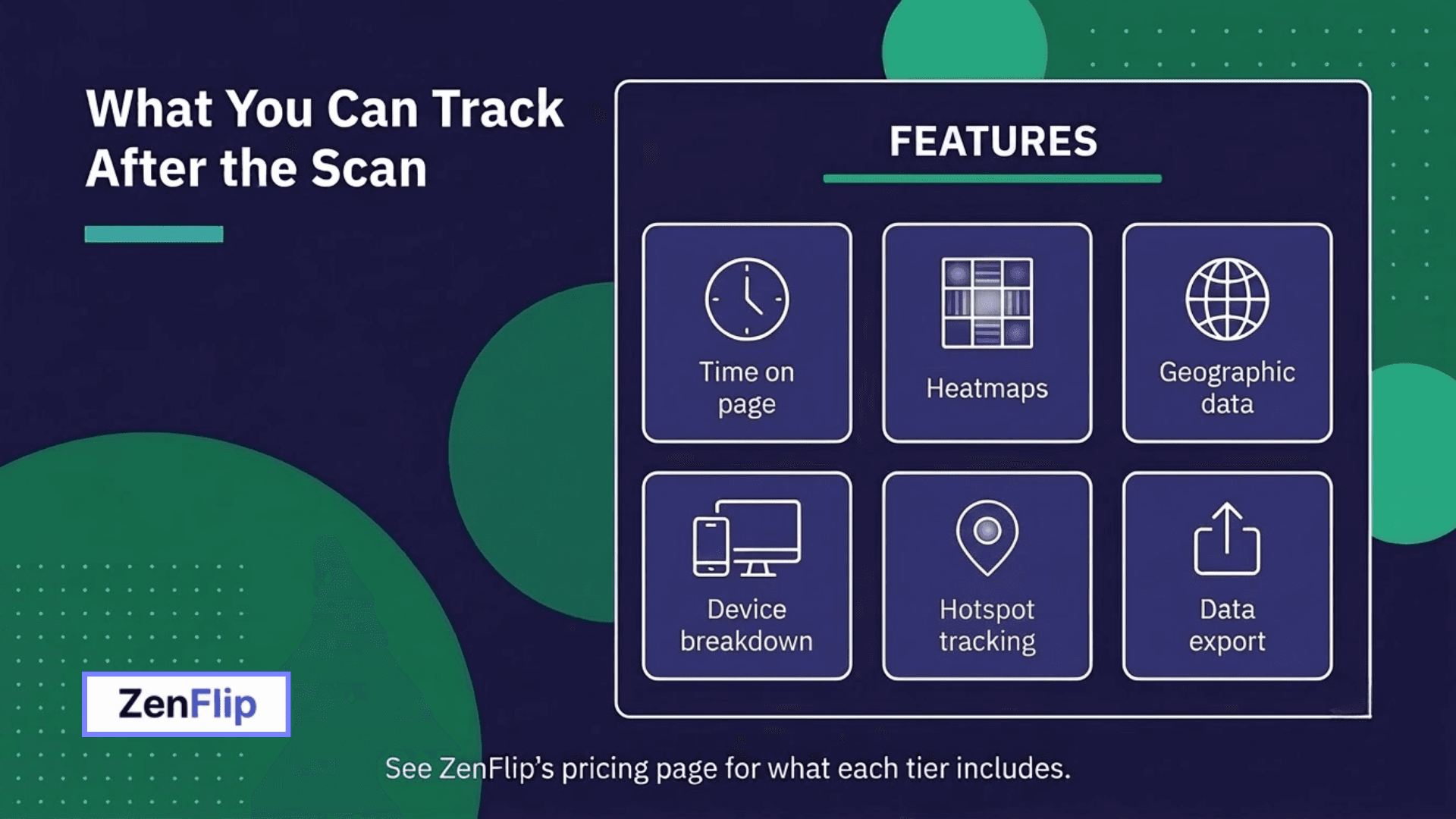
What readers do after a scan may shape the next print run.
Page-level insight
The free tier includes page-level view tracking, which can show which pages get read and which get skipped. Time on page, heatmaps, geographic data, device breakdown, UTM tracking, share counts and data export are listed as paid features, as are unlimited analytics history and new versus returning readers who are signed in to a library. ZenFlip's hospitality page suggests a practical use: if one package draws readers while another is skipped, a team could reorder or redesign before the next print run.
Read: ZenFlip | Features | Analytics
Campaign attribution
ZenFlip notes that UTM parameters work with any analytics platform and that there is no direct Google Analytics integration. Teams that run several print campaigns may want to plan their tracking approach before the codes go to press.
Privacy considerations
For business buyers who ask about data handling, ZenFlip describes its analytics as using no cookies and no browser fingerprinting, writing nothing to the reader's device. Raw IP addresses are not stored, and the dashboard reports visits rather than people, since an anonymous reader returning next week counts as a new visit. Teams may still want to review the details with their own compliance contacts.
Accessibility signals
ZenFlip also reports TTS Sessions, which count unique reading sessions where a reader started text-to-speech. For organisations that print a code on public-facing material, that paid analytics metric might show whether audio reading is being used by the people who scan.
Turn Scans Into Leads
A QR code for an interactive PDF may also work as the front door to a lead capture flow.
Forms and gated content
As a paid feature, ZenFlip lets teams add a lead form that appears before or during reading, collecting name, email, company and phone number. A form can also be marked as required, so readers submit it before viewing the publication. Gating may suit premium material such as reports or detailed price guides more than a general brochure.
Routing to your CRM
As a paid feature, each submission can also trigger a real-time Zapier webhook, which ZenFlip says can connect to HubSpot, Salesforce, Mailchimp and other tools. Submissions also appear in the dashboard with timestamps. Lead capture is not part of the free tier, so teams planning to collect enquiries at an event may want to check what their account includes beforehand.
Follow up after the event
ZenFlip's retail page describes the days after a trade show as the moment the dashboard becomes useful: it can show which visitors engaged with the catalogue, which products they viewed and how long they spent on each page. A lead capture form can also collect buyer contact details during the event itself. Sales teams may find that this kind of detail helps them prioritise conversations instead of treating every scan equally.
Read: ZenFlip | Features | Lead Capture
Make the Destination Look Like Your Brand
A printed code that leads to a generic page can weaken an otherwise polished piece.
Logo, colours and watermark
The free tier keeps ZenFlip branding on the viewer. A custom logo, brand colours and removal of the ZenFlip watermark are paid features.
White-label and custom domain
As paid features, the white-label viewer carries no ZenFlip references, and a custom domain can be set up with a single CNAME record. Each publication can have its own branding settings, which ZenFlip suggests may help agencies that publish under several client brands from one account.
Read: ZenFlip | Features | Lead Capture
Extend the Same Publication Beyond Print
The flipbook behind a QR code for an interactive PDF does not have to live only on paper. ZenFlip's pages describe a shareable public link, available on the free tier, that can be sent through WhatsApp, email and partner portals. Using one publication across print and digital channels may keep the message consistent and the analytics in one place, which could simplify reporting for sales and marketing teams.
Where Teams Might Apply It
ZenFlip's industry pages offer several starting points.
Retail and wholesale: catalogues, seasonal lookbooks, wholesale price lists and trade show brochures.
Hospitality and travel: hotel brochures, F&B menus, destination guides, wedding and event packages and travel agent rate sheets.
Multi-property groups: ZenFlip states that paid plans support multiple publications under one account, so separate branded brochures could sit in one dashboard.
Read: ZenFlip | Use Case | Online catalogue maker
A Short Checklist Before You Print
Confirm the publication is published, since the QR option depends on it.
Download the PNG from the Share button and keep the original file for your printer.
Scan the code on more than one phone before approving the proof.
Decide whether a public or password-protected version fits the audience.
Check which analytics and lead features are free and which are paid.
Consider placing a short line near the code that tells people what they will see.
Next Step
ZenFlip's free tier lists five publications of up to 30 pages each, which may be enough to test one QR code for an interactive PDF on a single brochure before rolling it out across a campaign. Paid options add deeper analytics, lead capture, white-label branding and custom domains for larger programmes, and ZenFlip's pricing page shows exactly which features sit on which side.
Visit: ZenFlip | Pricing
FAQ
What is a QR code for an interactive PDF?
Based on ZenFlip, it is a code that leads to your published flipbook, so a printed brochure, banner or tag may open the interactive version of your PDF on a phone.
Do readers need an app to scan it?
ZenFlip's retail page describes visitors scanning the code and browsing on their phones with no app required.
How do I get the QR code?
Publish the flipbook first. Then click the Share button next to the Embed option and download the QR code as a PNG. ZenFlip's developer documentation also lists QR code generation in the Publications API.
Where can I print the code?
ZenFlip's examples include booth graphics, business cards and product tags. Menus, rate sheets and event packages are other possibilities.
Can I use different codes for trade and retail buyers?
ZenFlip describes a public version and a separate password-protected version, each with its own URL and analytics, which may suit separate codes. Password protection is a paid feature.
What analytics are free and what are paid?
The free tier includes page-level view tracking. Time on page, heatmaps, geographic and device data, UTM tracking, share counts, data export, unlimited history and new versus returning signed-in readers are listed as paid features.
Does ZenFlip analytics use cookies?
ZenFlip describes its analytics as using no cookies and no browser fingerprinting, and not storing raw IP addresses. Teams may still wish to review the details with their compliance contacts.
Can I collect leads from people who scan?
Lead forms and gated content, which collect name, email, company and phone, are paid features. Zapier webhooks that can route submissions to tools such as HubSpot, Salesforce and Mailchimp are also paid. Lead capture is not part of the free tier.
Can the page carry my brand?
The free tier keeps ZenFlip branding. A custom logo, brand colours and watermark removal are paid features, as are the white-label viewer and a custom domain through a CNAME record.
What is a TTS Session?
ZenFlip counts a TTS Session when a reader starts text-to-speech from scratch in a reading session, which may show how many readers use audio reading. The metric is listed as a paid analytics feature.
What do readers see after scanning?
ZenFlip's pricing page lists page flip animation, scroll mode, fullscreen, zoom and text search and a thumbnail sidebar across all tiers, alongside accessibility features such as keyboard navigation, screen reader support and text-to-speech. ZenFlip's hospitality page describes a responsive viewer that works on iOS, Android and other mobile browsers.
Is there a free way to try it?
ZenFlip's free tier lists five publications of up to 30 pages each. Please check the pricing page to see which features are free and which are paid.
#QRCode #InteractivePDF #ZenFlip #DigitalFlipbook #B2BMarketing #TradeShowMarketing #DigitalCatalog #PrintToDigital #SalesEnablement #DigitalPublishing
Turn your next PDF into a flipbook — free
No credit card, no watermarks, no time limits. 5 publications on the free plan — ready in under 2 minutes.