Accessible Flipbook for ADA Title II: How Community Colleges Can Publish Accessible PDFs.
ADA Title II compliance dates were extended in 2026. See how community colleges and public bodies can plan PDF accessibility with an accessible flipbook, a VPAT review and a course catalog checklist.
Written By: Jagadish C U (Founder of Zentrovia Solutions)
ZenFlip, the publishing platform from Zentrovia Solutions, is designed to help colleges, public bodies and nonprofits work toward accessibility compliance when they publish PDFs as an accessible flipbook. It does not make documents accessible on its own, so publishers still need to do their part. Its Accessibility Conformance Report (VPAT) is published as a downloadable PDF, and its procurement options include quotes, purchase orders and security questionnaires.
Under the DOJ's April 2026 interim final rule, Title II web compliance dates are April 26, 2027 for larger entities and April 26, 2028 for smaller ones. Documents may be worth tackling early.
What ADA Title II Requires for Documents
The DOJ rule sets WCAG 2.1 Level AA as the technical standard for state and local government web content and mobile apps. Your deadline depends on the population of the government your institution belongs to, not on enrollment or staff numbers (see the DOJ first-steps guide). A public college that is part of a state or local government generally follows that government's population.
What counts as an exception
Documents may qualify for exceptions. Preexisting PDFs and similar files posted before your compliance date may be exempt, unless they are used to apply for, gain access to or take part in your services. DOJ's own example states there is no exception for educational course content. Even where an exception applies, effective communication duties may still require an accessible version on request.
Why a Plain PDF on a Website May Be a Compliance Risk
Files posted after your compliance date may fall outside the preexisting-document exception. DOJ's examples suggest applications for current programs and required course reading would probably need to meet WCAG 2.1. A course catalog that helps students enroll may sit in the same category, though your counsel can confirm.
What DOJ's examples suggest
Old meeting minutes and scanned records may qualify as preexisting, if they are not used to access services.
Applications for current programs and documents listing current ordinances probably need to comply.
An archive exception may apply, but only to clearly labeled archives of content created before your compliance date and no longer updated.
Where a flipbook fit
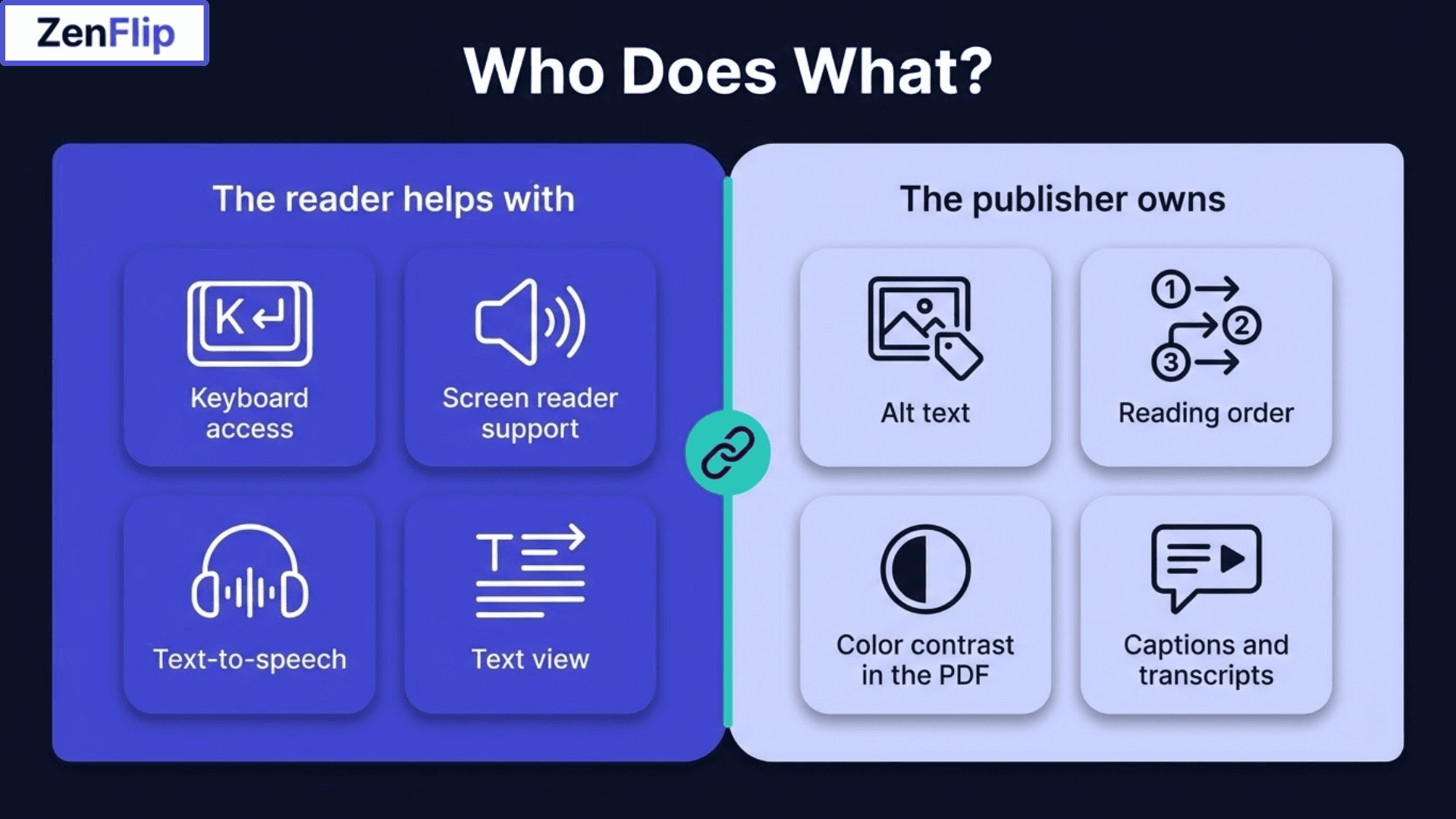
You may see the phrase "ADA compliant flipbook", but no viewer alone can make a document compliant. ZenFlip is designed to help organizations work toward compliance and does not make content accessible automatically. Its accessibility page calls this shared responsibility: the reader handles keyboard, screen reader and text-to-speech support, while the publisher owns alt text, reading order, color contrast inside the PDF and captions or transcripts for audio.
ZenFlip's Accessibility Statement says accessibility depends on the source PDF, recommends PDF/UA, and describes its components as partially conformant as of February 2026. Treat the reader as a foundation, and check the newer VPAT for current support levels.
What an Accessible Flipbook Reader Should Do
Keyboard access
Page turning, search and menus should work without a mouse, with visible focus and skip links. ZenFlip's self-assessed VPAT reports keyboard operation of every reader function, with skip links to page content and navigation.
Screen reader support
Readers should hear headings, lists, tables and image descriptions in a logical order. ZenFlip is designed to carry tagged-PDF structure into the flipbook, adds text-to-speech, and offers a Text view that presents the whole publication as reflowing HTML text. An untagged source PDF cannot be enriched, per the VPAT. For scans and image-only pages, publishers need to add page descriptions, and ZenFlip offers editable descriptions with AI suggestions to help.
Contrast and media
The VPAT reports interface contrast measured from rendered pixels. ZenFlip does not test contrast inside page images, so publishers should check their own files. Audio and video hotspots can carry transcripts and captions.
How to Check an Accessible Flipbook Vendor
Start by asking for the VPAT. ZenFlip publishes its report in full, with no form, based on VPAT 2.5Rev. It covers WCAG 2.0, 2.1 and 2.2 at Levels A and AA, Revised Section 508 and EN 301 549.
Then read the limits. The report is a self-assessment, not an independent audit. It notes there is no audio-description track, JAWS testing has not been repeated since the October 2026 changes, and testing outside the reader is automated only. DOJ's guide also lists contract practices some entities found useful: detailed accessibility information before signing, and warranties that vendors do not disclaim. Working with a vendor does not remove your own responsibility.
Questions worth asking any vendor
Is the report a self-assessment or an independent audit?
What must the publisher supply, such as alt text and transcripts?
Checklist for Publishing a Course Catalog Accessibly
DOJ suggests involving more than web developers: procurement staff help ensure you buy accessible content, and training can cover designers, content authors and purchasing teams. Consider naming one owner for catalog accessibility.
DOJ advises against leaving testing to the last minute.
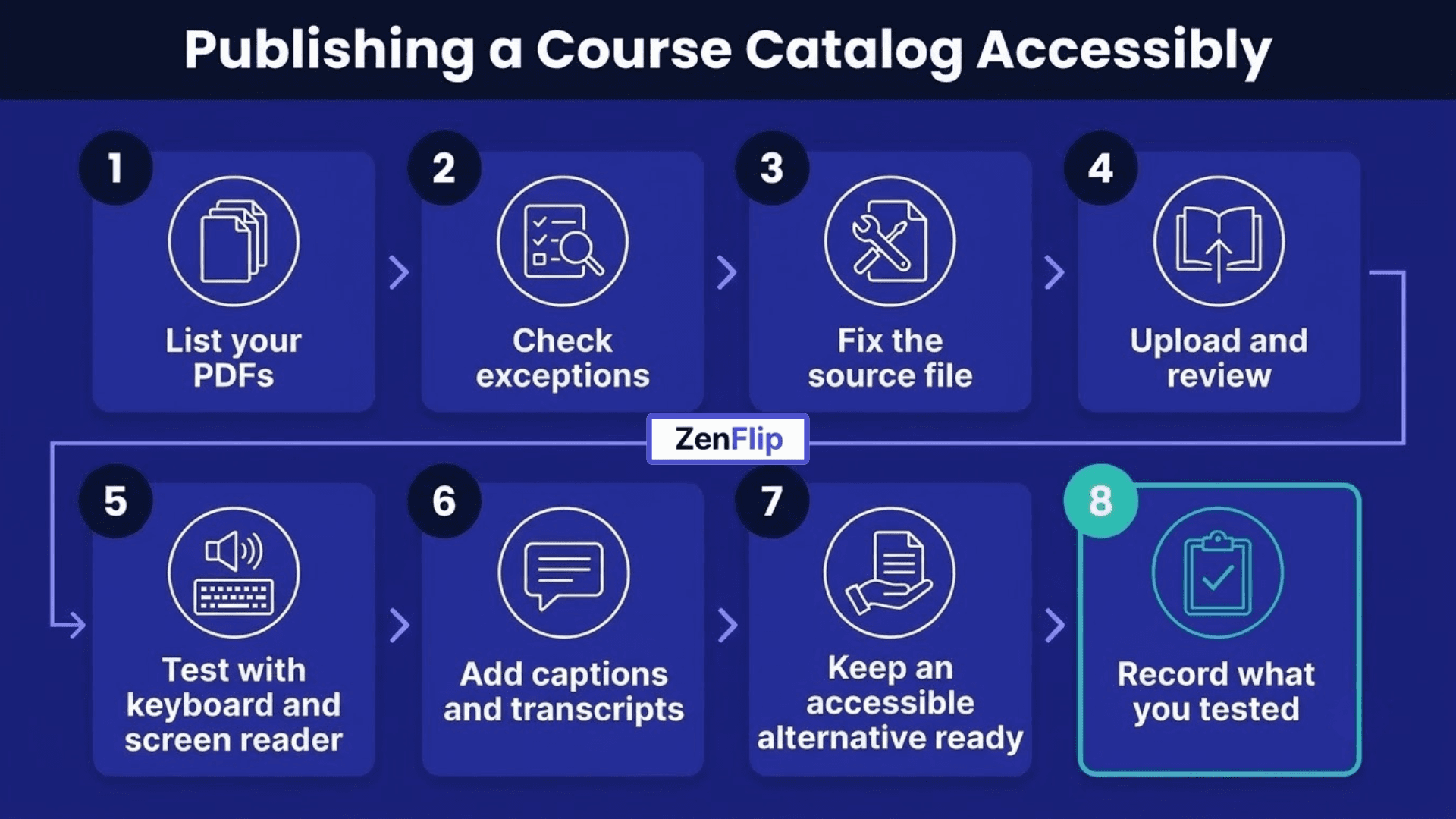
List your PDFs, from catalogs and program sheets to application forms.
Check each against the exceptions, and assume current-program documents need to comply.
Fix the source: add alt text, check reading order and color contrast, and export a tagged PDF with real headings, lists and tables.
Upload the file and open ZenFlip's accessibility review, which lists suggestions with the WCAG criterion for each. It never blocks publishing, so your team needs to act on it.
Test with a keyboard and a screen reader, since DOJ notes automated tools alone cannot test everything.
Add transcripts or captions to any audio and video hotspots.
Keep an accessible alternative ready on request.
Update the catalog at the same link by uploading a new PDF, and record what you tested and when.
Keep the Catalog Current Without Breaking Links
Uploading a new PDF to the same publication keeps existing links and embeds working, so website and LMS pages may need no rework. Re-run your accessibility checks on each version.
How ZenFlip Fits Institutional Buying
Institutions can buy by quote, pay by purchase order against a net-30 invoice, or use card, ACH or wire. ZenFlip completes vendor forms and security questionnaires, including HECVAT, and sends a Data Processing Agreement on request. Colleges can keep some publications public and others password-protected, and package content for an LMS with SCORM export (see the education page).
Consider testing a sample catalog on the free plan and sharing the VPAT with your accessibility coordinator.
Frequently Asked Questions
What does ADA Title II require for PDFs?
The DOJ rule sets WCAG 2.1 Level AA for web content, which can include PDFs, unless an exception applies.
What are the Title II deadlines?
April 26, 2027 for entities with a population of 50,000 or more, and April 26, 2028 for smaller entities and special district governments.
Which deadline applies to a community college?
It depends on the population of the government the college is part of, not enrollment. Confirm with counsel.
Can I update a catalog without changing its link?
Yes. Upload a new PDF to the same publication and existing links and embeds keep working. Re-check accessibility on each new version.
Who should own document accessibility?
DOJ suggests involving procurement, content authors and training teams, not only web developers. Consider naming one owner for the catalog.
Are older PDFs exempt?
Preexisting PDFs may be exempt, unless used to apply for, access or take part in services. DOJ's example states there is no exception for course content.
Does ZenFlip make PDFs accessible automatically?
No. ZenFlip is designed to help organizations work toward accessibility compliance. Publishers remain responsible for alt text, reading order, color contrast and captions in their files, and ZenFlip offers tools to help.
Is there an ADA compliant flipbook?
No viewer alone can make a document compliant. An accessible flipbook can support an effort that includes fixing the source file.
What should I ask an accessible flipbook vendor for?
Ask for the VPAT, then read its limits and ask about contract warranties.
Does ZenFlip publish a VPAT?
Yes, in full with no form, as a self-assessment rather than an independent audit.
How can a college buy ZenFlip?
By quote, purchase order with a net-30 invoice, or card. ZenFlip will complete HECVAT and other vendor forms.
What belongs on a course catalog checklist?
List your PDFs, check exceptions, fix the source, test with a keyboard and screen reader, add media transcripts, and record your testing.
Turn your next PDF into a flipbook — free
No credit card, no watermarks, no time limits. 5 publications on the free plan — ready in under 2 minutes.