From PDF to Flipbook in Minutes - A Step-by-Step Publishing Guide
Learn how to convert a PDF to a flipbook in minutes with ZenFlip. This step-by-step guide covers upload, conversion, and publishing - with built-in WCAG 2.2 AA accessibility included on every plan.
Written By: Jagadish C U (Founder Of Zentrovia Solutions)
If you have ever shared a PDF and wondered why no one opened it, the format is likely part of the problem. Static files require downloads, do not adapt well to mobile screens, and give readers no reason to keep scrolling. Converting a PDF to flipbook changes that entirely - turning your document into a page-turning, mobile-responsive publication that readers can engage with directly in their browser.
This guide walks you through exactly how to make a flipbook from a PDF, what to look for in a PDF to flipbook converter, and why ZenFlip is built to make the process as straightforward as possible.
What Is a PDF to Flipbook Converter?
A PDF to flipbook converter is a tool that takes an uploaded PDF file and transforms it into an interactive digital publication with a realistic page-turn effect. The resulting flipbook is readable in any browser, requires no download from the reader, and works consistently across desktop and mobile devices.
Unlike static PDFs, digital flipbooks can include zoom, full-text search, and accessibility features. They are shareable via a direct link and embeddable on websites. For publishers, educators, marketers, and businesses, the PDF to flipbook format closes the gap between the content they create and the experience readers actually want.
Read: Interactive Flipbooks vs Static PDFs: Which Drives More Results?
Why Convert PDF to Flipbook?
The case for converting a PDF to an interactive flipbook comes down to three things: reach, engagement, and accessibility.
Reach
A flipbook lives online and opens instantly in a browser. There is no file to download and no software to install on the reader's side. Sharing is as simple as copying a link. This removes the friction that causes many PDF shares to go unread.
Engagement
Page-level behaviour becomes visible when you publish as a flipbook. Tools like ZenFlip show publishers which pages readers spend time on and where they drop off - data that a shared PDF cannot provide. Knowing how readers move through your content lets you improve it.
Accessibility
A well-built digital flipbook can reach readers that a standard PDF cannot. ZenFlip includes WCAG 2.2 AA accessibility compliance across all plans, including the free tier. This means text-to-speech with word highlighting, screen reader support, Microsoft ImmersiveReader, and dyslexia support are built into every flipbook published through ZenFlip - not locked behind a premium upgrade. Read: ZenFlip | Features
How to Create a Flipbook from PDF Using ZenFlip
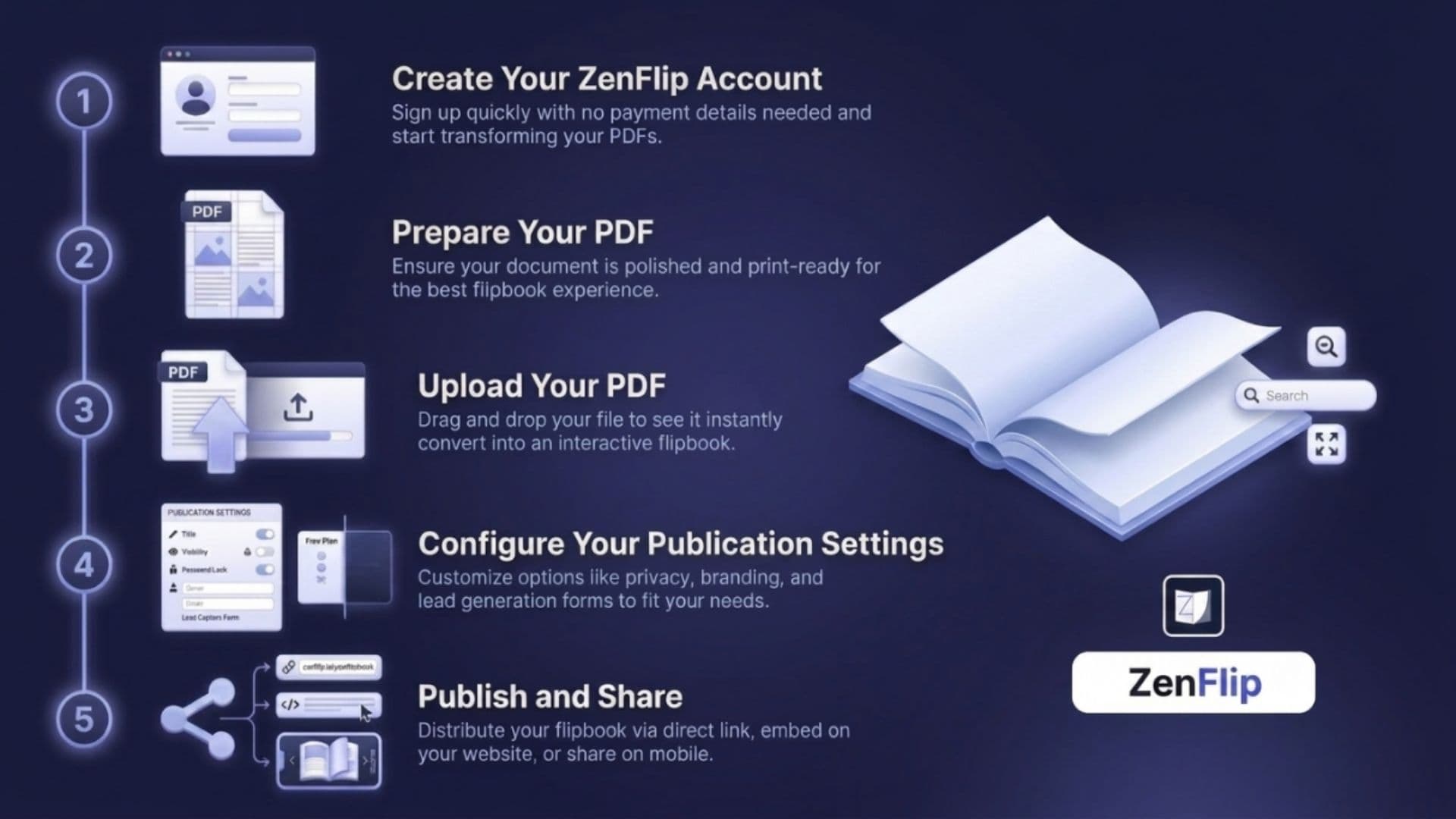
ZenFlip is a web-based PDF to flipbook converter that requires no software installation and no design experience. The conversion process is handled automatically after upload.
Step 1 - Create Your Free ZenFlip Account
Go to zenflip.io and sign up for free. No credit card is required and the free plan does not expire. The Explorer plan includes 5 publications at no cost, making it a practical way to test the platform before committing to a paid plan.
Step 2 - Prepare Your PDF
Before uploading, make sure your PDF is finalised. ZenFlip converts the PDF as uploaded, so any layout, fonts, and images you want in the flipbook should be set in the source document. The cleaner and more structured the PDF, the sharper the output flipbook.
Step 3 - Upload Your PDF
From your ZenFlip dashboard, select the option to create a new publication and upload your PDF file. ZenFlip handles the conversion automatically - there is no manual page setup or configuration required. The flipbook is generated with page-turn animations, zoom functionality, full-text search, and fullscreen reading mode as standard.
Step 4 - Configure Your Publication Settings
Once converted, you can set a title and description for your flipbook, adjust visibility settings, and configure sharing options. On paid plans, additional settings include password protection, lead capture forms, and custom branding. On the free plan, the ZenFlip viewer is applied by default.
Step 5 - Publish and Share
When your settings are saved, publish the flipbook and copy the share link. ZenFlip publications can be shared directly via link, embedded on a website or blog, or sent to a specific audience with access controls on paid plans. The flipbook is immediately accessible to readers on any device. Watch: ZenFlip | The Complete Guide Playlist
What Makes ZenFlip Different as a Digital Flipbook Creator?
Most PDF to flipbook tools treat accessibility as an optional extra or a premium feature. ZenFlip is built differently. Every plan - including the free tier - includes WCAG 2.2 AA compliance, text-to-speech with word highlighting, screen reader support, ImmersiveReader, and dyslexia support as default features of every published flipbook.
This matters practically. If your content reaches a broad audience - customers, students, employees, or the general public - accessibility cannot be an afterthought. With ZenFlip, it is not one.
Page-Level Analytics
ZenFlip's analytics go beyond total view counts. Publishers can see which specific pages readers engage with and where they stop reading. This gives you the kind of actionable data that helps improve content performance over time - not just confirm that it was opened.
No Setup Required
The step-by-step flipbook guide above is short because the process genuinely is short. Upload a PDF, and the flipbook is ready. There is no learning curve, no design editor to navigate before publishing, and no technical configuration. For teams and individuals who want to publish quickly and reliably, that simplicity is the point.
Who Is This Digital Publishing Guide For?
The PDF to flipbook workflow suits a wide range of publishing needs:
Marketers sharing brochures, lookbooks, and campaign materials
Educators distributing course materials, reading guides, and handbooks
Publishers releasing magazines, catalogues, and editorial content
Businesses sharing reports, onboarding documents, and product guides
Nonprofits and community organisations publishing newsletters and accessible public information
If you are currently sharing PDFs by email attachment or file link and want more engagement and better reach, converting to a flipbook is a practical, low-effort upgrade.
Start Publishing with ZenFlip
Converting a PDF to flipbook does not require technical skills, a design background, or a paid subscription to get started. ZenFlip's free plan gives you 5 publications to create and share at no cost, with no expiry date and no credit card required. Built-in accessibility features mean your flipbooks are ready for a wide audience from the moment they go live.
If you need more - more publications, branding removal, lead capture, analytics depth, or team access - ZenFlip's paid plans start at $15 per month.
Start your first publication at zenflip.io.
Explore More on ZenFlip
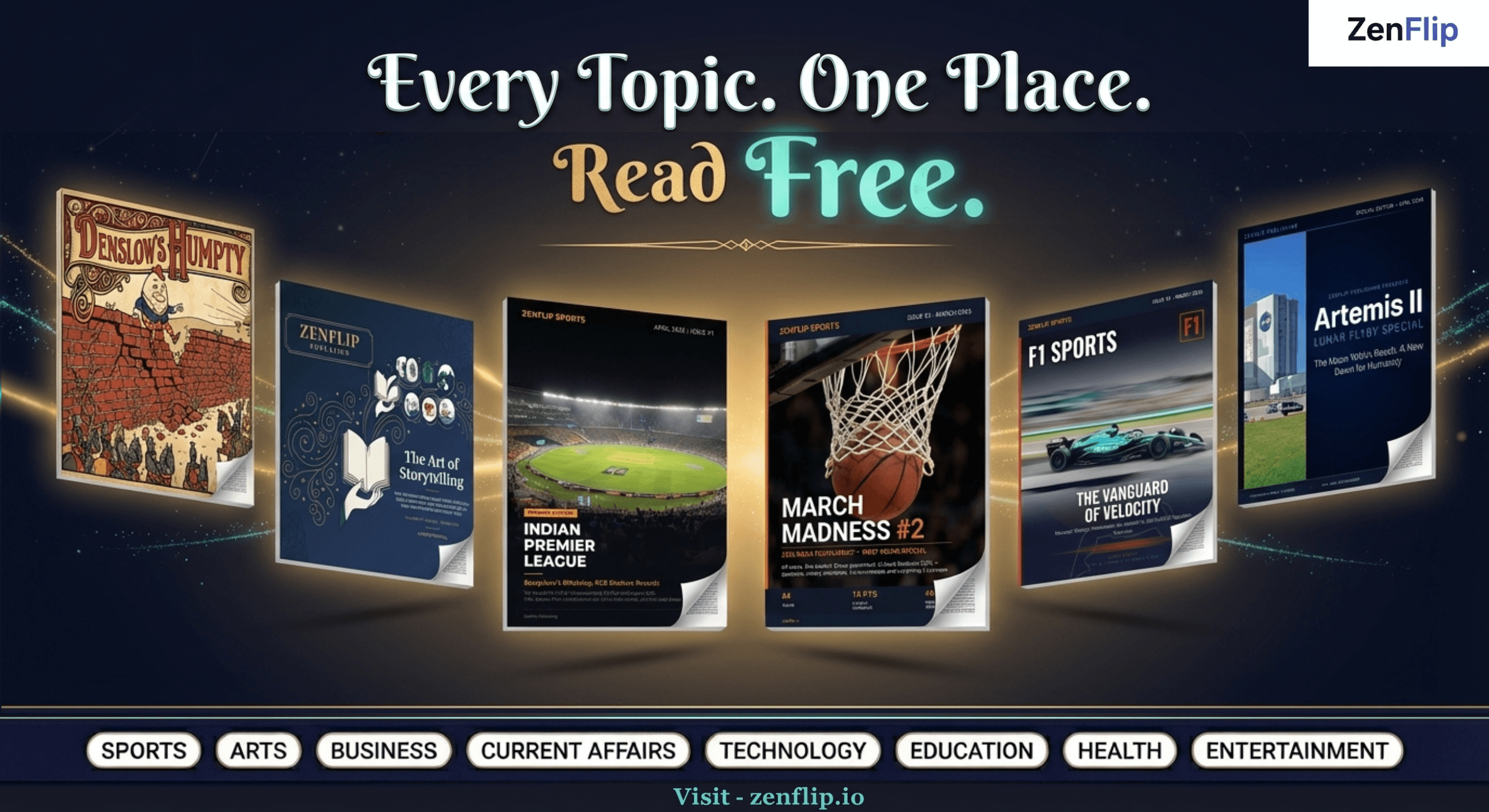
Looking for more insights on digital publishing, accessibility, sports, technology and more? The ZenFlip Library has you covered. Browse our full collection of free interactive magazines.
Every topic. One place. Read free at ZenFlip | Library
Frequently Asked Questions
What is a PDF to flipbook converter?
A PDF to flipbook converter is a tool that transforms an uploaded PDF into an interactive digital publication with a page-turn effect. The resulting flipbook opens in a browser with no download required and works on desktop and mobile devices.
How do I convert a PDF to a flipbook using ZenFlip?
Sign up for a free ZenFlip account at zenflip.io, upload your PDF from the dashboard, and ZenFlip converts it automatically. No design experience or configuration is required. The flipbook is ready to share immediately after conversion.
Is ZenFlip free to use?
Yes. ZenFlip's free plan (Explorer) includes 5 publications at no cost, with no expiry and no credit card required. Paid plans start at $15 per month and add features including branding removal, lead capture forms, password protection, and extended analytics.
Does ZenFlip support accessibility features?
Yes. ZenFlip includes WCAG 2.2 AA accessibility compliance on all plans, including the free tier. Built-in features include text-to-speech with word highlighting, screen reader support, Microsoft ImmersiveReader, and dyslexia support. These are included as standard on every published flipbook.
What is the difference between a PDF and a digital flipbook?
A PDF is a static document that requires downloading and a compatible viewer. A digital flipbook created from a PDF opens directly in a browser, works on mobile and desktop, includes interactive features like zoom and text search, and provides publishers with reader engagement data through analytics.
Can I embed a ZenFlip flipbook on my website?
Yes. ZenFlip flipbooks can be embedded directly on websites and blogs. They are mobile-responsive and require no plugin or software on the reader's device.
Who should use a PDF to flipbook converter?
PDF to flipbook conversion is useful for marketers, educators, publishers, businesses, and nonprofits who want to share documents with broader reach, better engagement, and accessible reading experiences compared to standard PDF sharing.
Hashtags
#PDFtoFlipbook #DigitalPublishing #FlipbookMaker #ZenFlip #ConvertPDFtoFlipbook #InteractiveFlipbook #DigitalFlipbook #PDFConverter #StepByStepGuide #OnlinePublishing
Turn your next PDF into a flipbook — free
No credit card, no watermarks, no time limits. 5 publications on the free plan — ready in under 2 minutes.