Reading Order and Logical Structure in Flipbooks: A WCAG Compliance Deep Dive
Why flipbook reading order matters for screen reader users - covering WCAG SC 1.3.2 Meaningful Sequence, SC 2.4.3 Focus Order, and how logical content structure underpins truly accessible digital publishing.
Written By: Jagadish C U (Founder Of Zentrovia Solutions)
Flipbook Reading Order: The Foundation of WCAG-Compliant Digital Publishing.
Digital publications have introduced an accessibility challenge that print never had to solve. In a printed book, reading order is fixed by the physical page. In a flipbook or digital reader, it is determined by the underlying document structure - and when that structure does not match what appears on screen, the experience breaks entirely for people using assistive technology. Getting flipbook reading order right is not a nice-to-have. It is a foundational requirement of WCAG-compliant, accessible digital publishing.
What Reading Order Means for Digital Document Accessibility
Visual layout versus document flow accessibility
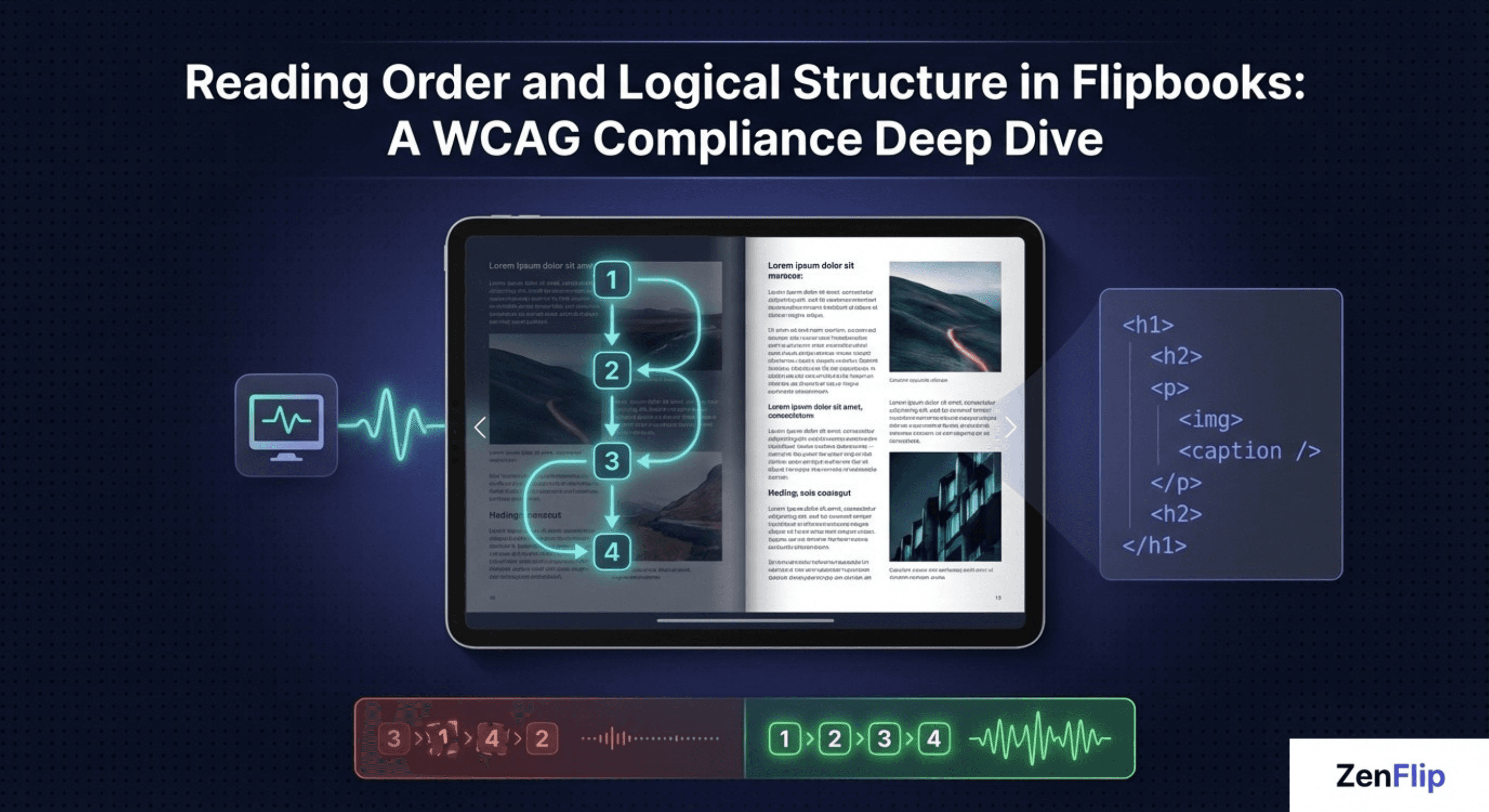
Screen readers do not see a page the way a sighted user does. They traverse the Document Object Model - the underlying code structure - in the order elements appear in the source, not in the visual order they appear on screen. In a flipbook with complex layouts, double-page spreads, pull quotes, captions, and overlapping elements, the visual order and the document flow accessibility order can diverge significantly.
When that divergence happens, a screen reader user may encounter a page number before the heading it belongs to, or a pull quote in the middle of a sentence it was designed to interrupt visually but not logically. Navigation controls may be read before the page content they relate to. The result is a logical content structure that makes no sense to the person navigating by ear, regardless of how polished the visual design is.
Read: Your Complete Guide to Accessible Digital Publications in 2026
WCAG Success Criteria That Govern Reading Order
SC 1.3.2 Meaningful Sequence - what it requires
The primary WCAG success criterion for reading order is SC 1.3.2 - Meaningful Sequence, introduced at Level A in WCAG 2.0 and carried forward through WCAG 2.1 and 2.2. It states: if the sequence in which content is presented affects its meaning, a correct reading sequence can be programmatically determined.
In practical terms, this means the source order of your flipbook content must reflect a coherent, logical reading sequence. If a user navigating by assistive technology encounters content in an order that changes its meaning or makes it impossible to follow, the document fails this criterion regardless of how it looks visually. SC 1.3.2 is a Level A requirement - the minimum level of WCAG conformance - meaning any flipbook that fails it cannot claim any level of WCAG compliance.
SC 2.4.3 Focus Order and tab order optimization
SC 2.4.3 - Focus Order, also Level A from WCAG 2.0, addresses keyboard navigation specifically. It requires that if a page can be navigated sequentially and the navigation sequence affects meaning or operation, focusable components must receive focus in an order that preserves meaning and operation.
For a flipbook, this means interactive elements - page navigation controls, table of contents links, search fields, and in-reader buttons - must receive keyboard focus in a logical order that reflects the expected user workflow. Tab order optimization is not just a usability preference. It is a direct WCAG compliance requirement and a core component of assistive technology compatibility.
WCAG reading order mapping: SC 1.3.2 Meaningful Sequence (Level A, WCAG 2.0) governs the source order of all content. SC 2.4.3 Focus Order (Level A, WCAG 2.0) governs the keyboard navigation sequence of interactive elements. SC 1.3.1 Info and Relationships (Level A, WCAG 2.0) requires that structure and relationships conveyed visually are also programmatically determinable. All three have been in force since WCAG 2.0.
Read: Screen Reader Compatible Flipbooks: What Publishers Need to Get Right in 2026
Why Flipbooks Present Unique Reading Order Challenges
The gap between visual layout and screen reader sequencing
Standard web pages typically flow in a single column with predictable structure. Flipbooks introduce complexity that most web interfaces do not have: double-page spreads with content spanning two visual columns, decorative elements interspersed with body copy, captions positioned visually near their images rather than sequentially in source order, and overlapping layers that create visual hierarchy without structural hierarchy.
Each of these represents a potential meaningful sequence failure. A caption that appears after its image visually but before it in source order will be announced before the image - stripped of context. A navigation control that sits at the bottom of the page visually but appears early in the DOM will receive keyboard focus before the content, disrupting the tab order optimization needed for inclusive UX design.
"A flipbook that looks accessible to a sighted user can be completely unusable for a screen reader user if the document flow accessibility has not been addressed at the structural level."
The challenge is not that flipbooks are inherently inaccessible. It is that their visual richness, if not matched by rigorous logical content structure in the underlying code, creates a significant gap between the sighted and non-sighted reading experience.
Watch: How to Make Your PDF Flipbooks Accessible | ZenFlip Tutorial
What Correct Flipbook Reading Order Implementation Looks Like.
Building logical content structure into the publication from the ground up
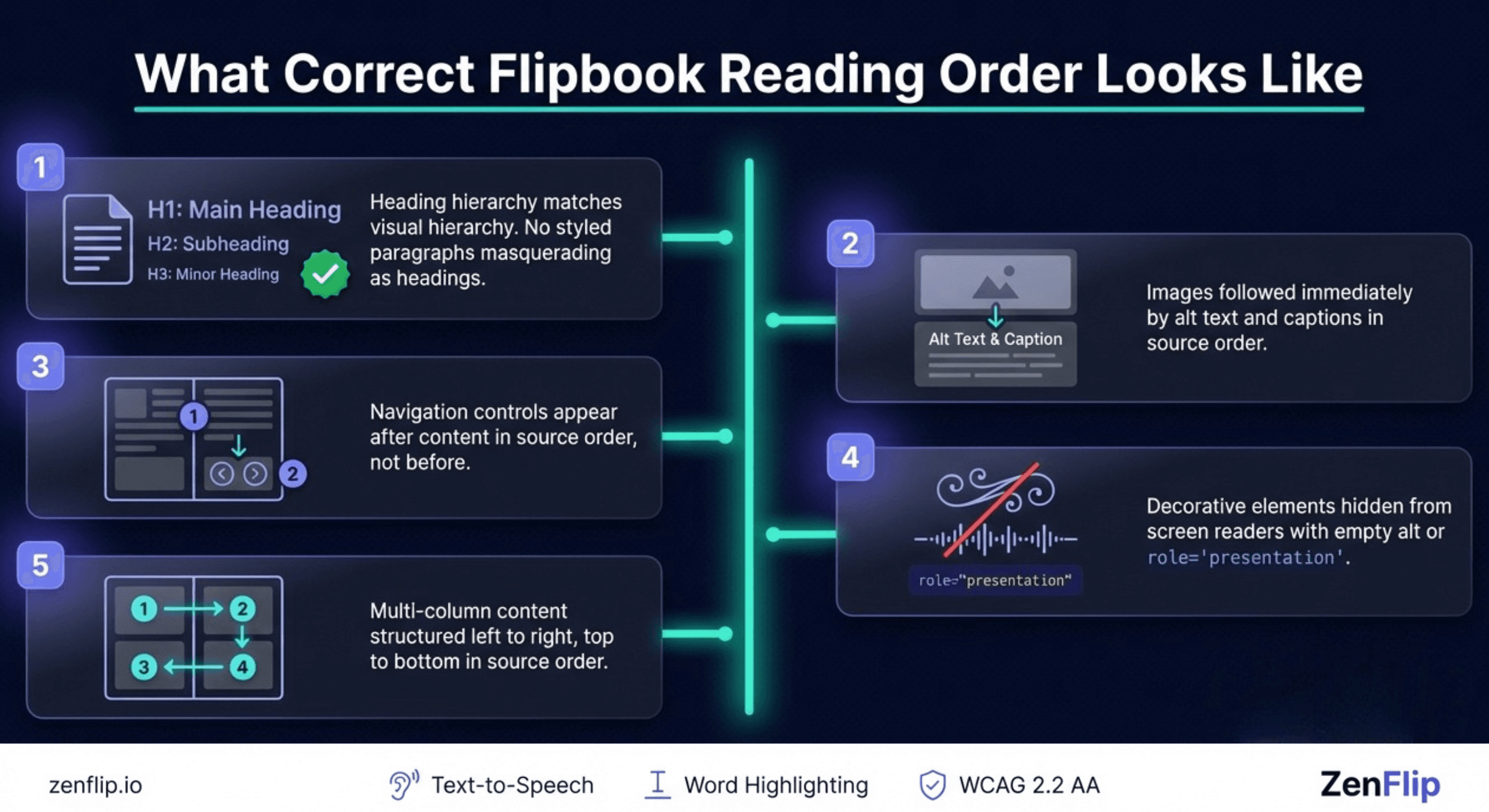
Correct flipbook reading order requires treating the source order as the primary accessibility layer, not an afterthought. For publishers and platform developers, this means several consistent practices across every publication:
Heading hierarchy must match the visual hierarchy. A section title that appears large and prominent on screen should be an H2 or H3 in the source, not a styled paragraph with no structural meaning.
Images should be immediately followed by their alt text and captions in source order, even when the visual layout positions them differently.
Interactive controls should appear in the source order that matches their logical function - page navigation after content, not before.
Decorative elements should be marked with empty alt attributes or role="presentation" so screen readers skip them, preventing them from disrupting the meaningful sequence.
Multi-column content should be structured in source order to read left to right, top to bottom, consistent with the expected reading direction for the language.
These practices are not complex for a publication built with accessibility in mind from the start. For publications retrofitted for digital document accessibility after the fact, they require a careful audit of source order against the visual output - checking that what screen reader sequencing delivers matches what the content intends.
How ZenFlip Approaches Accessible Digital Publishing

ZenFlip, the digital publishing platform built by Zentrovia Solutions, targets WCAG 2.2 AA conformance as a foundational layer of its reader design. As documented in ZenFlip's accessibility statement, the platform implements ARIA labels throughout its interactive elements, supports full keyboard navigation, provides visible focus indicators, and includes skip links - all of which directly support assistive technology compatibility and inclusive UX design for publishers choosing an accessible digital publishing platform.
Understanding the principles behind WCAG-compliant reading order remains important for publishers and content teams even when working within a platform built for accessibility. Knowing how meaningful sequence and tab order optimization function enables better structural decisions at the point of authoring - before content ever reaches the reader.
How ZenFlip Delivers Text Content to Screen Readers
The blog covers what correct reading order implementation should look like structurally. It is worth understanding the specific mechanism by which ZenFlip makes that content available to assistive technology in practice.
ZenFlip uses MuPDF to extract all text from every page of a PDF and renders it as a transparent overlay positioned precisely over the visual page. This is what screen readers traverse the extracted text layer, not the visual rendering. Every word is given precise coordinates through word-level mapping, enabling screen readers, text-to-speech, and search to access content accurately and in sequence.
Paragraph detection runs on top of the extracted text, analysing vertical gaps, font sizes, and font faces to identify natural section breaks. This allows the platform to understand where one logical content unit ends and another begins - directly relevant to how the reading sequence is structured for assistive technology.
Publishers can also define editable page descriptions for each page in the editor. Screen readers announce these descriptions when a reader navigates between pages, giving each page a programmatic label that reflects its content. This is an additional control publishers have over how their publication's structure is communicated to readers who cannot rely on visual context alone.
Visit - zenflip.io
Accessible Digital Publishing Requires Structure, Not Just Styling
Visual accessibility - colour contrast, font size, focus indicators - is something sighted users and developers can see and check. Reading order and logical content structure are invisible to sighted users, which is precisely why they are so consistently overlooked. A flipbook that looks polished and professional on screen can still fail its screen reader users entirely if document flow accessibility has not been addressed.
SC 1.3.2 and SC 2.4.3 are Level A WCAG requirements. They represent the floor of accessible digital publishing, not the ceiling. Getting flipbook reading order right is the baseline from which everything else in a WCAG-compliant publication is built. Without it, no amount of visual polish constitutes genuine accessibility.
For more on how ZenFlip approaches inclusive digital publishing and WCAG-compliant document structure,
Explore More on ZenFlip

Looking for more insights on digital publishing, accessibility, sports, technology and more? The ZenFlip Library has you covered. Browse our full collection of free interactive magazines.
Every topic. One place. Read free at ZenFlip | Library
Frequently Asked Questions:
What is reading order and why does it matter for digital publications?
In a flipbook or digital reader, reading order is determined by the underlying document structure — not the visual layout. When that structure does not match what appears on screen, the experience breaks for people using assistive technology. Getting reading order right is a foundational requirement of WCAG-compliant digital publishing.
How do screen readers navigate a flipbook?
Screen readers traverse the underlying code structure in the order elements appear in the source, not the visual order on screen. In a flipbook with complex layouts, the visual order and the document flow can diverge significantly. When this happens, a screen reader user may encounter a page number before its heading, or a pull quote in the middle of a sentence it was never meant to interrupt logically.
What is SC 1.3.2 and what does it mean for flipbooks?
SC 1.3.2 - Meaningful Sequence requires that if the sequence of content affects its meaning, a correct reading sequence can be programmatically determined. In practical terms, the source order of your flipbook must reflect a logical reading sequence. It is a Level A requirement, meaning any flipbook that fails it cannot claim any level of WCAG compliance.
What is tab order and why does it matter?
SC 2.4.3 - Focus Order requires that interactive elements receive keyboard focus in a logical order that preserves meaning and operation. For a flipbook, this means navigation controls, table of contents links, and in-reader buttons must follow a logical sequence. It is a direct WCAG compliance requirement, not just a usability preference.
Why are flipbooks harder to get right than standard web pages?
Flipbooks introduce complexity most web interfaces do not have — double-page spreads, decorative elements, captions positioned near images, and overlapping layers. Each of these represents a potential meaningful sequence failure. A flipbook that looks accessible to a sighted user can be completely unusable for a screen reader user if the document structure has not been addressed.
What does correct reading order implementation look like?
Heading hierarchy must match the visual hierarchy, images should be immediately followed by their alt text and captions in source order, and interactive controls should appear after content — not before. Decorative elements should be marked so screen readers skip them entirely. These practices are straightforward for publications built with accessibility in mind from the start.
How does ZenFlip support accessible reading order?
ZenFlip targets WCAG 2.2 AA conformance as a foundational layer of its reader design. As documented in ZenFlip's accessibility statement, the platform implements ARIA labels, full keyboard navigation, visible focus indicators, and skip links. These directly support assistive technology compatibility for publishers choosing an accessible digital publishing platform.
Why is reading order so often overlooked?
Visual accessibility - colour contrast, font size, focus indicators - is something sighted users and developers can see and check. Reading order and logical content structure are invisible to sighted users, which is precisely why they are so consistently overlooked. A flipbook that looks polished on screen can still fail its screen reader users entirely if document structure has not been addressed.
How does ZenFlip make PDF text available to screen readers?
ZenFlip uses MuPDF to extract all text from every PDF page and renders it as a transparent overlay for screen readers, search, and text selection. Every word is given precise coordinates through word-level mapping, enabling screen readers to access content accurately and in sequence.
Can publishers control what screen readers announce when navigating between pages?
Yes. ZenFlip includes editable page descriptions - a per-page text field in the editor that screen readers announce when a reader navigates to that page. This gives publishers a way to provide programmatic context for each page's content, independent of what is visually on the page.
#FlipbookAccessibility #WCAG #DigitalPublishing #A11y #ScreenReader #LogicalStructure #AccessibleDesign #InclusiveUX #WCAG22 #ZenFlip
Turn your next PDF into a flipbook — free
No credit card, no watermarks, no time limits. 5 publications on the free plan — ready in under 2 minutes.