Interactive Holiday Catalog: PDF to Interactive Digital Flipbook Guide
The Holiday season is close. See how ZenFlip may help businesses turn a holiday PDF into an interactive holiday catalog with product links, AI questions and page analytics in five practical steps.
Written By: Jagadish CU (Founder Of Zentrovia Solutions)
ZenFlip, the digital publishing platform from Zentrovia Solutions, may be a practical way for publishers, brands and retailers to turn a static PDF into an interactive holiday catalog. It converts PDF, Word and PowerPoint files into online flipbooks with clickable product links, an AI reader assistant and page-level analytics that a printed catalog may not easily provide. For publishers and B2B teams, that could mean one source file to maintain and clearer insight into what readers view.
The holiday season is starting soon. This guide covers why print-style catalogs may underperform online, a five-step ZenFlip setup, shoppable links, shopper questions and post-season analytics. Every ZenFlip feature mentioned here comes from the ZenFlip website.
Static PDF vs Interactive Flipbook: What Changes for Your Holiday Catalog
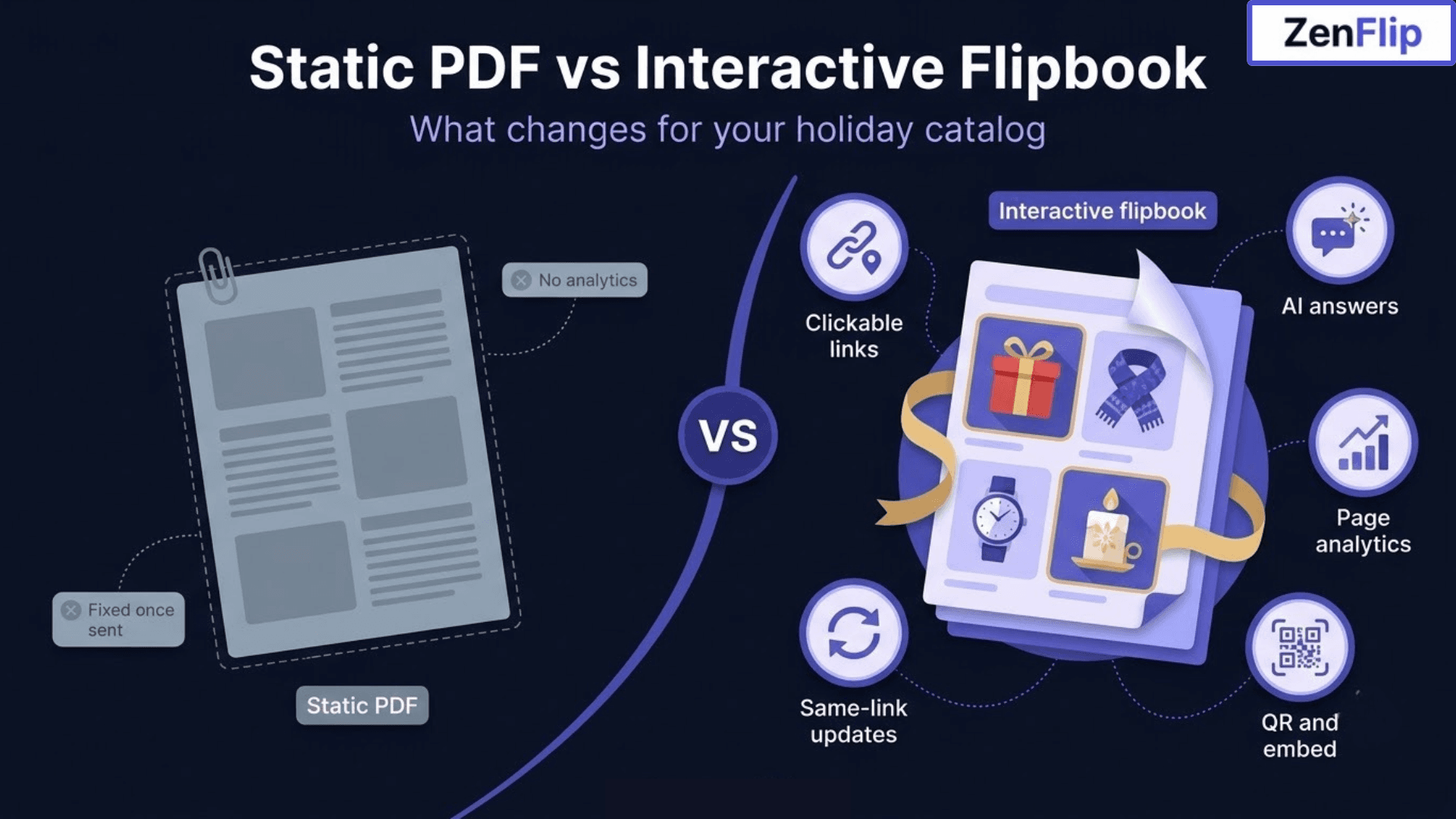
A static PDF is easy to export and send, but it stays a fixed file once it is out. An interactive holiday catalog built from the same PDF can behave more like a small web experience. The comparison below shows where the two formats differ.
Static PDF | Interactive flipbook with ZenFlip | |
|---|---|---|
Updates | Changes usually mean sending a new file. | Upload a new PDF to the same publication and existing links and embeds keep working. |
Product links | Depend on how the file was built. | Clickable hotspots on product images, names and calls to action. |
Questions | Readers scroll and search on their own. | ZenGuy, an AI assistant, answers from the catalog text. |
Visibility | No tracking or analytics, so it is hard to see what buyers care about. | Page-level views on every plan, with heatmaps and more on eligible plans. |
Sharing | Usually sent as an attachment or download. | Link, embed code or QR code. |
Access | Anyone who has the file can pass it on. | Public, private or password-protected. |
Read the retail and wholesale page for more on why page-level data may help merchandising teams plan with evidence rather than assumptions.
How to Build an Interactive Holiday Catalog in Five Steps
A PDF can go live in under five minutes, although your time may depend on file size and customisation. For more detail, see the PDF to flipbook guide.
Step 1: Prepare your PDF
Check a few things first. Embed your fonts when you export. Avoid flattened image pages, because their text may not be extractable or readable by screen readers. Aim for roughly 150 to 300 DPI so pages look sharp. A quick test is to select text in the PDF: if you can copy a sentence, ZenFlip should be able to extract it. Scanned catalogs may need OCR first. ZenFlip is designed to help with accessibility compliance, but it does not make a catalog accessible automatically. The accessibility page explains that results also depend on your source PDF.
Step 2: Upload your file
Create a free account, then upload a PDF, Word (.docx) or PowerPoint (.pptx) file. The free Explorer plan includes five publications and does not require a credit card, so a first holiday catalog can be tested at low risk. Page limits and features differ by plan, so it may help to review the pricing page before you start.
Step 3: Brand it and choose who can see it
Add your logo and colours. On eligible plans you can also use a custom domain and a white-label viewer, so shoppers see your brand rather than a third-party tool (see custom branding). Then choose public, private or password-protected access. Brands that sell direct and through wholesale may publish a public consumer catalog and a separate password-protected trade version. Each version has its own URL and analytics.
Step 4: Preview and publish
Preview the flipbook, check that fonts and images rendered correctly, then publish. You get a shareable link and an embed code, plus a QR code for print and in-store use.
Step 5: Share it across your channels
Use the direct link in email and social posts. You can also embed the flipbook on your site with an iframe or the JavaScript SDK, which work on platforms such as Shopify and WooCommerce (see embedding). Consider adding UTM parameters to your links so you can compare campaigns later in the analytics.
Add Shoppable Links to Your Digital Holiday Catalog
Clickable hotspots from the online catalog maker can be placed on elements across a page, including product images, product names and calls to action. Each hotspot can point to your online store, a specific product page or an external website.
Where to place links first
Gift-guide and hero products, so shoppers have a clear next step.
Exact product pages rather than a general category page, which may shorten the path to purchase.
A lead capture form for wholesale enquiries. Forms are listed on Creator plans and above, and Zapier webhooks on Business and above can help route leads toward a CRM.
Test every link before you share the catalog, since a broken link can interrupt a shopper's journey.
Let Shoppers Ask Questions in Your Interactive Holiday Catalog
What ZenGuy does
ZenGuy is the built-in AI assistant (see AI features). Readers type a question in natural language, and ZenGuy answers using the publication's own text, with clickable page references so they can check the source. AI chat is available on every plan when you connect your own OpenAI API key.
Using it for stock and size questions
Buyers can ask about product details, stock availability and minimum order quantities. Because answers are grounded in the catalog's content, ZenGuy may only be able to respond with information that is actually written on the pages, and it may not check live inventory. Consider adding size charts, availability notes and order minimums to the PDF before upload, and keep a clear link to your store for real-time stock.
The Holiday Catalog Template
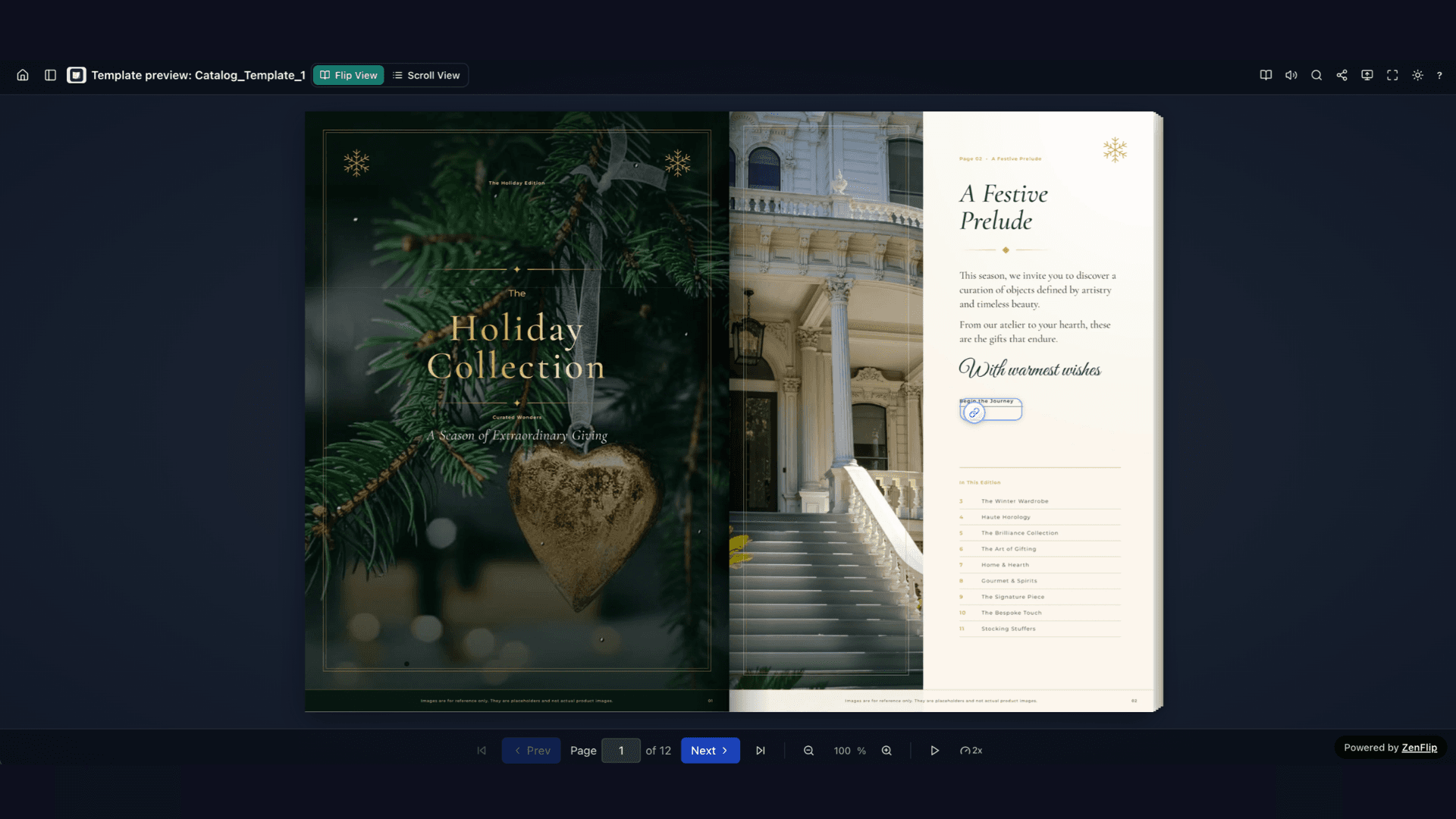
Short on time? Start with our ready-made holiday catalogue template. It has 12 pages, including a cover, gift ideas by category, product pages and a closing page, all with placeholder photos you can swap for your own. Replace the images, add your product names, descriptions and prices, and use the link hotspots to send readers to your own pages. Once it looks right, publish it as a flipbook. You can edit the template in ZenFlip’s editor, so no design skills are needed.
Catalog Link: ZenFlip | Templates
Read Your Interactive Holiday Catalog Analytics After the Season
What you can track
Every plan includes page-level view tracking. Creator plans and above add time on page, heatmaps, geographic data, device breakdown, UTM tracking, share counts and data export, and Business plans keep unlimited analytics history (see analytics). Analytics are cookie-free, though you should confirm privacy requirements with your own legal team.
Turn the data into next season's plan
Compare heatmaps across spreads to see which product groups held attention and which may need a stronger layout.
Use UTM data to compare email, social and in-store QR sources.
Export page-level data for your own reporting tools.
Review pages where readers appear to drop off, and consider moving key offers earlier next year.
Accessibility in ZenFlip: What It Offers and What Publishers Still Own
ZenFlip is designed to help organisations work toward accessibility compliance. Its reader targets WCAG 2.2 AA and does not rely on a third-party accessibility overlay. ZenFlip does not make a catalog accessible automatically, and its Accessibility Statement lists components as partially conformant as of February 2026.
What ZenFlip provides
In the reader: keyboard navigation, focus handling, screen reader support, text-to-speech and a Text view.
For publishers: automatic text extraction, editable page descriptions with AI-suggested image descriptions, audio transcripts and captions, and an accessibility review that lists suggestions with the WCAG criterion for each.
What publishers still need to do:
Results depend on the source PDF. Publishers remain responsible for alt text, reading order, colour contrast inside the PDF, and captions or transcripts for audio. Review the accessibility page and the VPAT against your own requirements before you publish.
Is ZenFlip the Right Fit for Your Business?
ZenFlip is built for retail and wholesale teams, commercial publishers and associations. For businesses that print seasonal catalogs, an interactive holiday catalog may reduce republishing work, create a trackable path from page to product and give merchandising teams data for the next campaign. Plans and limits differ, so consider testing with the free plan before Black Friday.
Thanksgiving offer: ZenFlip is offering 15% off every paid plan. Use code THANKYOU at checkout before 30 November. See the pricing page for plan details.
Frequently Asked Questions
What is an interactive holiday catalog?
A seasonal product catalog published online as a flipbook rather than a static PDF. With ZenFlip, it can include product links, AI questions and page analytics.
How do I turn a PDF holiday catalog into a flipbook?
Prepare the PDF, upload it, add branding and access settings, then preview and publish. ZenFlip accepts PDF, Word (.docx) and PowerPoint (.pptx) files, and it can take under five minutes.
Can I add clickable product links?
Yes. Hotspots can be placed on product images, names and calls to action that can point to your store, a product page or another website.
Can shoppers ask about stock or size?
ZenGuy answers from the catalog's text, so that information may need to be on the pages. It may not check live inventory. AI chat works on every plan with your own OpenAI API key.
What analytics will I see?
Every plan includes page-level views. Creator plans and above add time on page, heatmaps, geographic and device data, UTM tracking, shares and export.
Can I update the catalog after publishing?
Yes. You can upload a new PDF to the same publication, and existing links and embeds continue to work.
Can I offer separate retail and wholesale versions?
Yes. Publish a public consumer catalog and a separate password-protected trade version, each with its own URL and analytics.
How can I share the catalog in store or at events?
Every published flipbook can have a QR code, which can be printed on displays, packaging or booth graphics.
Can I embed it on my online store?
Yes. Use an iframe embed or the JavaScript SDK, which work on platforms such as Shopify and WooCommerce.
Is there a free plan?
Yes. The Explorer plan includes five publications and no credit card. Limits differ by plan.
#InteractiveHolidayCatalog #DigitalCatalog #Flipbook #PDFtoFlipbook #ZenFlip #BlackFriday2026 #B2BMarketing #DigitalPublishing #ShoppableContent #RetailTech
Turn your next PDF into a flipbook — free
No credit card, no watermarks, no time limits. 5 publications on the free plan — ready in under 2 minutes.