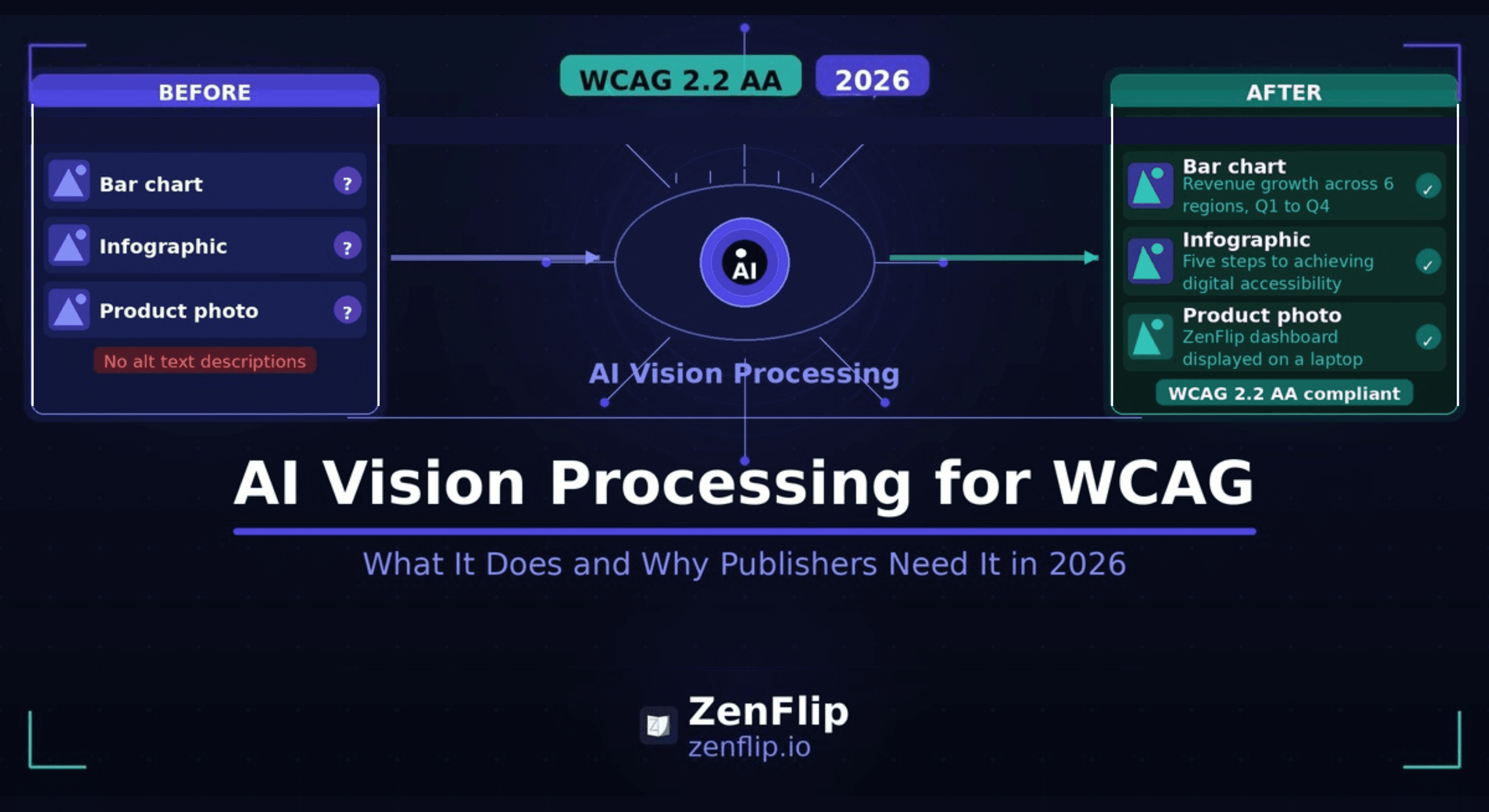
AI Vision Processing for WCAG: What It Does and Why Publishers Need It in 2026.
Discover how AI Vision Processing for WCAG resolves the alt text in flipbooks and digital publications, supporting WCAG 2.2 AA and ADA Title II compliance in 2026
Written By: Jagadish C U (Founder Of Zentrovia Solutions)
Using AI Vision Processing to Reach WCAG Compliance Faster
Alt text is one of the oldest and most fundamental requirements in digital accessibility. WCAG 1.1.1 - the very first success criterion in the Web Content Accessibility Guidelines - requires a text alternative for every non-text element. Charts, diagrams, infographics, product images: each one needs a description that conveys the same information to someone who cannot see it.
In theory, this is straightforward. In practice, for publishers producing flipbooks, digital brochures, and ebooks at scale, it is one of the most difficult accessibility requirements to meet consistently. AI Vision Processing for WCAG is changing that.
The Alt Text Problem in Digital Publications
Most digital publications originate as PDFs. A well-prepared PDF from InDesign or Word can carry alt text through to the exported file if the author adds it at the source. But this rarely happens consistently in practice. Product catalogues with hundreds of images, annual reports with dozens of charts, and brochures assembled from multiple sources often go to publication with little or no alt text on visual content.
The result is a document that fails digital publication accessibility requirements from the first page.
Why Scaling Alt Text Manually Does Not Work
Manual alt text creation requires someone to open every image, assess what information it conveys, write a clear description, and apply it - for every page, every publication, every update. For a small marketing team publishing ten documents a year, this is manageable. For organisations publishing regularly across multiple formats, it quickly becomes a bottleneck that delays publication or gets skipped entirely.
This is the gap that AI-generated image descriptions are designed to fill.
What Is AI Vision Processing for WCAG?
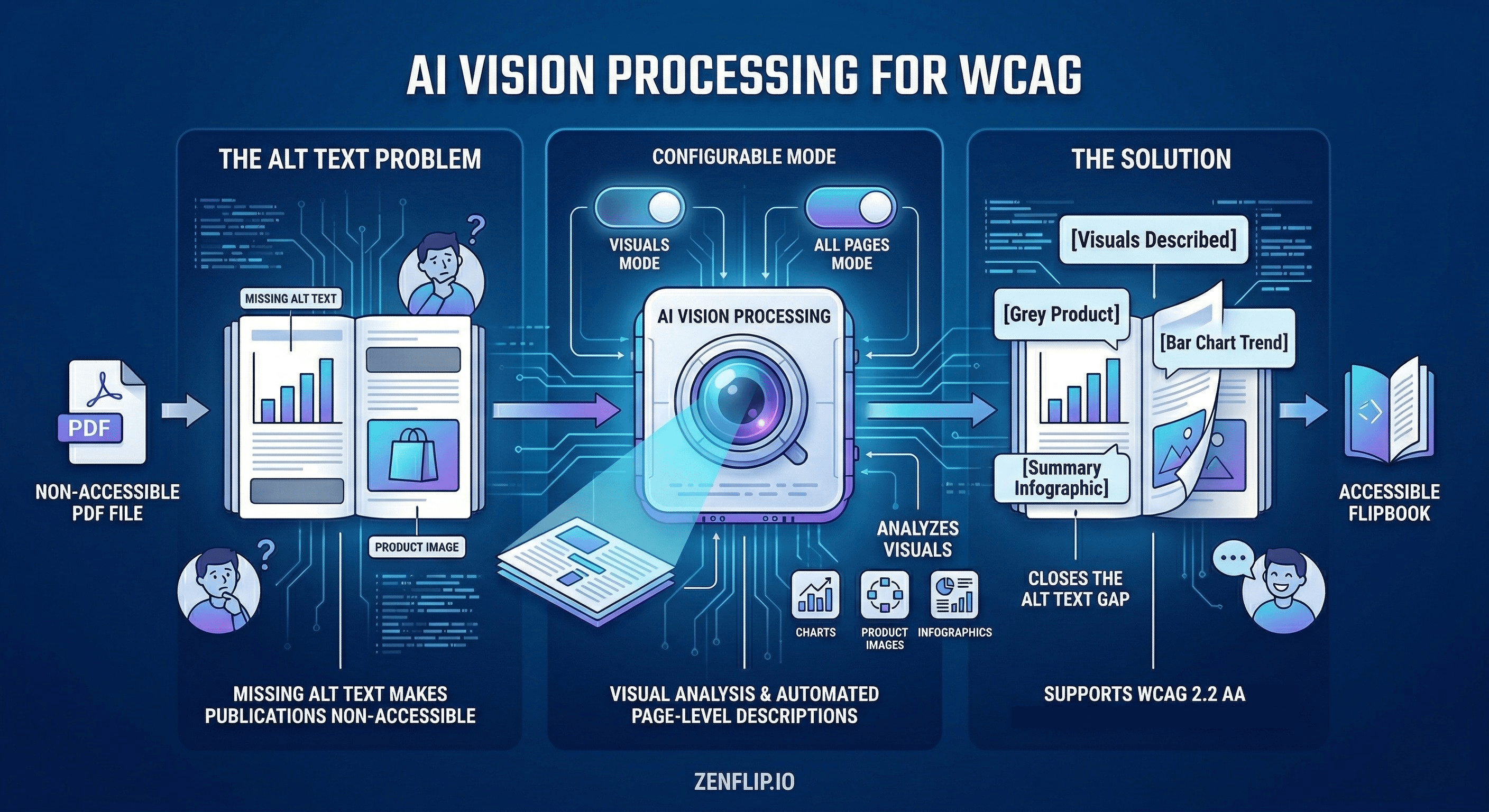
AI Vision Processing for WCAG is a capability that analyses the visual content of a publication page and generates descriptive text based on what it finds. Rather than relying on alt text embedded in the source PDF, the platform analyses each page visually and produces descriptions that screen readers can access.
This approach addresses a specific and common failure point: the publication that arrives with no accessibility metadata at all. Instead of requiring publishers to retroactively add alt text to source files, AI Vision Processing works at the delivery layer, providing descriptions where none exist.
Smart Mode and All Pages Mode
Not every page of a document needs the same level of visual description. A text-heavy page with a single decorative border requires different treatment from a page built entirely around a data visualisation.
ZenFlip's AI Vision Processing is configurable per publication. Smart Mode analyses visual-heavy pages and applies descriptions where the content is primarily non-text. All Pages Mode generates page-level descriptions across every page regardless of content type. Publishers can choose the approach that suits their content and review or edit descriptions before publication.
Read: Your Complete Guide to Accessible Digital Publications in 2026
AI Vision Processing for WCAG Compliance 2026
WCAG 2.2 AA compliance in 2026 involves meeting success criteria across four principles: perceivable, operable, understandable, and robust. The perceivable principle is where alt text lives, but it is broader than a single requirement. Every non-text element must have a text alternative. Content must not rely on visual characteristics alone to convey meaning. Colour contrast must be sufficient.
AI-generated image descriptions directly support the perceivable principle by ensuring that visual content in a flipbook or digital brochure is not invisible to screen readers. When a reader using a screen reader reaches a page containing a bar chart, a product diagram, or an infographic, AI Vision Processing for WCAG provides the description that makes that content accessible.
ADA Title II Compliance Tools in 2026
The DOJ has extended the ADA Title II digital accessibility compliance deadlines by one year. Large public entities (population 50,000+) now have until April 26, 2027, while smaller public entities and special districts have until April 26, 2028.
For organisations preparing to meet these requirements, automated alt text for flipbooks is a practical tool for addressing a requirement that is difficult to meet through manual processes alone. AI Vision Processing does not replace a full accessibility audit, but it closes a gap that would otherwise require significant manual effort to address. Read: ADA Title II Deadline Extension - Your WCAG Guide to Interactive Accessibility in 2027
AI Vision Processing and the Future of Accessible Digital Publishing
Interactive Annual Report Software and AI Vision Processing
Annual reports are among the most visually complex documents publishers produce regularly — full-bleed photography, infographics, data visualizations, charts, and executive portraits often appear across the majority of pages. For publishers using flipbook platforms as interactive annual report software, AI Vision Processing closes a critical accessibility gap: image-heavy pages that carry no text alternative in the source PDF receive automatically generated page-level descriptions, making the content accessible to screen reader users without requiring manual alt-text authoring for every visual element. ZenFlip's AI Vision Processing operates in two modes: Smart Mode, which targets visual-heavy pages only, and All Pages Mode, which processes every page in the publication. For an annual report where the majority of pages are image-led, Smart Mode applies AI-generated descriptions where they are most needed without adding processing overhead to text-heavy pages.
Embed Flipbook on Website with Accessibility Intact
Every ZenFlip publication processed with AI Vision Processing can be embedded on any website using iframe embed code. The full accessibility layer - AI-generated page descriptions, ARIA labels, screen reader optimization, and keyboard navigation - is preserved inside the embedded viewer. Publishers embedding annual reports, sustainability reports, or capability documents on their own platforms retain the complete WCAG 2.2 AA compliance of the hosted publication.
Best Flipbook Software 2026 for Image-Heavy Publications
For publishers evaluating the best flipbook software 2026 for documents where visual content dominates, AI Vision Processing is a defining capability. Most flipbook platforms extract text from a PDF's text layer but treat the visual layer as outside their scope, leaving image-heavy pages inaccessible to screen reader users. ZenFlip's AI Vision Processing addresses the visual layer directly, extending WCAG compliance to publications that would otherwise fail the image description requirement regardless of how well the underlying text layer is structured.
Flipbook Statistics and Analytics
ZenFlip's analytics tools - 30-day analytics on the Creator plan ($15 per month) and heatmap analytics on the Business plan ($39 per month) - allow publishers to see engagement patterns across all publications, including those processed with AI Vision Processing. These flipbook statistics surface which pages attract the most reader attention, providing data for both content strategy and accessibility investment decisions. Publishers can use this data to identify which publication types benefit most from All Pages mode versus Smart mode processing.
How ZenFlip Uses AI Vision Processing for WCAG
ZenFlip's AI Vision Processing is one component of a broader accessibility architecture designed to support WCAG 2.2 AA compliance in digital publications. Every ZenFlip flipbook includes:
MuPDF text extraction for screen reader access and full-text search
AI Vision Processing for automated alt text generation on visual content
ImmersiveReader mode with four colour themes, OpenDyslexic font support, adjustable typography, line focus, and text-to-speech with word-by-word highlighting
Full keyboard navigation with 15 or more keyboard shortcuts
ARIA live regions that keep screen reader users informed of page changes
Automated Alt Text for Flipbooks in Practice
When a publisher uploads a PDF to ZenFlip and enables AI Vision Processing, the platform analyses each page visually. For pages identified as visual-heavy, it generates a page-level description. These descriptions are editable, so publishers can review and refine them before the publication goes live.
This workflow makes automated alt text for flipbooks practical for teams that do not have the capacity to write descriptions manually for every publication. The AI handles the initial generation. The publisher reviews and approves.
Accessible Digital Brochures and the Platform Layer
Digital publication accessibility involves two layers: the content itself and the delivery platform. Content-level accessibility - structured headings, sufficient colour contrast, meaningful alt text written at the source - remains the publisher's responsibility. Platform-level accessibility is the responsibility of the tool used to deliver the content.
Accessible digital brochures require both layers to work. A well-authored PDF delivered on an inaccessible platform will fail. A poorly authored PDF delivered on a platform with strong accessibility tools will also fail, but with a narrower gap to close.
AI Vision Processing for WCAG operates at the platform layer, providing a capability that most publishers cannot easily replicate at the content layer. It does not remove the need for careful content authoring, but it addresses one of the most difficult requirements to scale.
Visit: Zenflip.io
Watch: How to Publish Your First Flipbook on ZenFlip | PDF to Flipbook Tutorial
Explore More on ZenFlip

Looking for more insights on digital publishing, accessibility, sports, technology and more? The ZenFlip Library has you covered. Browse our full collection of free interactive magazines.
Every topic. One place. Read free at ZenFlip | Library
Frequently Asked Questions:
Why is alt text so difficult to scale for digital publications?
Manual alt text creation requires someone to open every image, assess what information it conveys, write a clear description, and apply it - for every page, every publication, every update. For organisations publishing regularly across multiple formats, this quickly becomes a bottleneck that delays publication or gets skipped entirely. This is the gap that AI-generated image descriptions are designed to fill.
What is AI Vision Processing for WCAG?
AI Vision Processing for WCAG is a capability that analyses the visual content of a publication page and generates descriptive text based on what it finds. Rather than relying on alt text embedded in the source PDF, the platform analyses each page visually and produces descriptions that screen readers can access. This approach addresses a specific and common failure point - the publication that arrives with no accessibility metadata at all.
What is the difference between Smart Mode and All Pages Mode?
Smart Mode analyses visual-heavy pages and applies descriptions where the content is primarily non-text. All Pages Mode generates page-level descriptions across every page regardless of content type. Publishers can choose the approach that suits their content and review or edit descriptions before publication.
How does AI Vision Processing support WCAG 2.2 compliance?
The perceivable principle in WCAG 2.2 requires that every non-text element has a text alternative. AI-generated image descriptions directly support this principle by ensuring that visual content in a flipbook or digital brochure is not invisible to screen readers. When a reader using a screen reader reaches a page containing a bar chart, a product diagram, or an infographic, AI Vision Processing provides the description that makes that content accessible.
How is screen reader compatibility different between PDFs and accessible flipbooks?
A PDF without a proper tag structure, reading order, or embedded alt text will produce a poor or meaningless experience for screen reader users, and fixing this after the fact requires access to the source file and authoring tools. ZenFlip uses MuPDF text extraction to create an invisible text layer over each page, enabling screen reader access, text selection, and full-text search without requiring changes to the source PDF. AI Vision Processing builds on this foundation by adding visual descriptions for content that text extraction alone cannot capture.
What does the AI Vision Processing workflow look like in practice?
When a publisher uploads a PDF to ZenFlip and enables AI Vision Processing, the platform analyses each page visually and generates a page-level description for visual-heavy pages. These descriptions are editable, so publishers can review and refine them before the publication goes live. The AI handles the initial generation and the publisher reviews and approves.
What are the two layers of digital publication accessibility?
Digital publication accessibility involves two layers - the content itself and the delivery platform. A well-authored PDF delivered on an inaccessible platform will fail, and a poorly authored PDF delivered on a platform with strong accessibility tools will also fail, but with a narrower gap to close. AI Vision Processing operates at the platform layer, providing a capability that most publishers cannot easily replicate at the content layer.
Related Resources: Talk to Your Documents: How AI Chat for Digital Publications is Replacing Static Reading in 2026
#WCAGCompliance #AIAccessibility #DigitalAccessibility #AltText #WCAG22 #AccessibleDesign #FlipbookAccessibility #AIVisionProcessing #InclusiveDigital #ZenFlip
Turn your next PDF into a flipbook — free
No credit card, no watermarks, no time limits. 5 publications on the free plan — ready in under 2 minutes.